

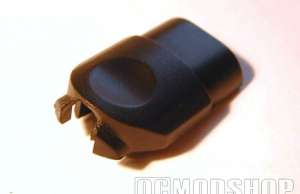
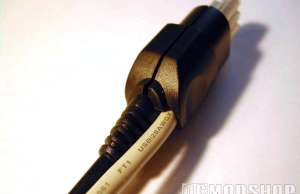
Don’t unplug that soldering iron just yet, we need to make a hole in the plastic casing of the Xbox connector. I just pushed the hot soldering iron in it giving me a great hole to work with, remove the excessive molted plastic with a knife, and test fit it.
Well that’s it. You’re done! I filled the gap of the cable with some superglue (using an accelerator so it dries instantly) so I can’t rip out the cable. Obviously Windows won’t install it like a recognized gamepad so you will need a driver; you can get it at the following URL.
[wpdm_package id=’28882′]
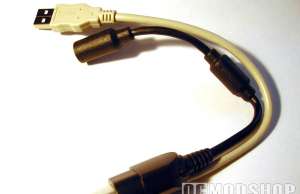
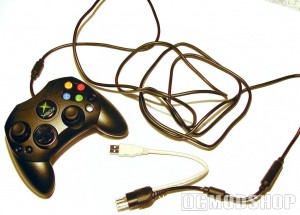
All that is left for me is to show of with the final pictures if you have any questions head over to the forums and ask them.



39 comments
Hey everyone, instead of soldering, you can strip the wires where the black coating is. and then join them together by twisting them together and then wrapping electrical tape around each wire (to the corresponding colours) until they are covered (to prevent a short circuit) and then give a few final wraps around all of the wires to complete the joining.
[…] say it's pretty sweet and since you may never play with your OG Xbox anymore why not try this out. http://www.ocmodshop.com/how-to-use-…sb-pc-gamepad/ Reply With […]
hi!
i have a xbox controller and i decided to follow this tutorial in order to be able to play with it on my pc!
however, after installing the xbcd drivers i tryed adjusting some stuff in the setup utillity but the controller was not recognised. in the device box there was just a blanc spot!
can you please help me?
Will this work on Mac?
O dear I see my old article *cough* "July 6, 2006" *cough* is still being looked at haha almost 6 years gone already, time does fly.
But seeing al these messages does give me a good feeling, but really now anyone still trying this, if you already have a wired 360 controller just plug it in Windows 7 or Vista should not have any problems with it.
No need for other drivers anymore just plug in and go ;).
However this is still a funny mod to do, if you`re bored and have an old spare xbox controller.
You know…. just for bragging rights.
Hey, so here's my problem, I got a HP ProBook 4520s with Windows 7 Ultimate 64Bit SP1. I have a Konig Xbox 360 controller, wired… When I plug it in, it doesn't recognizes that it's a controller, just a USB Generic Hub… Where did I go wrong ? I installed Xpadder, installed latest drivers from Redcl0ud's website, yet it still stays the same. I have to mention that my controller is always plugged in, and even tried plugging it in another USB port.
i attacked every thing perfectly, red to red green to green black to black and white to white but my computer wont recognize it and i have tried several different software. i took the wires apart and reassembled, but nothing.
Well guys try this for your 360 controller wireless. And it works great with F.E.A.R. 2 try its free you have to buy the microsoft reciver for your pc for 20.00 and do the set up thats it have fun ..
my game stop controller will work some time on gta 4 but my hp dosent see unkown device
I have an adapter that I got from guitar hero three that adapts from the guitar to my USB drive, will that work for a xbox controller (I don't have one so I can't test it.)
i stripped and conneccted wires and all.windows keeps telling me it cant install the needed software.ive tried everything i can think of. im running nes64.emu in vista.what am i not doing
i have the xbox controller usb connected and it reads on the driver but i cant use it on battlefield 2142 and i plan on getting test drive unlimited
ive followed instructions as far as wiring controller goes,downloaded and installed drivers,but x box controller doesnt work.when i plug it into computer,device manager says X BOX CONTROLLER, means some detection is taking place,butit doesnt cotrol the games.im trying to play TOMB RAIDER CHRONICLES which is sh*t on the keyboard. I NEED HEEEEEEEEEEEEEEEELP !!!
Honestly there's no reason to use a classic Xbox controller on the PC anymore… just use any Xbox 360 controller.
Windows XP and Vista have excellent support for the 360 controller, and should work in all of your games.
This is just for people that prefer the original controller to the 360 one.
In case you don’t have an Xbox 360 but still have a few of these laying around gathering dust, it just might come in handy to know how to do this
no office but thats a pretty dumb statement
I've an old xbox controller here , but dont own a 360 and to be blunt cant afford to shell out for one….
The Xbox 360 controller works as-is. Just plug it in and it should work on any XP or Vista system… but you might want to download the latest drivers from MS.
You can even connect the wireless 360 controller to the PC if you have the Wireless Receiver for Windows.
Do I have to modify the 360 controller as well, or does it work as it is? And second, do I need any driver for the pc to use the 360 controller?
to people who have it working but can't controll games, download xpadder
I tried to install the Xbox gamepad on my pc using windows xp operating system via usb with many issues. I would not recommend this controller to anyone out there to use on pc.
1. Issues loading drivers, old new.
2. Once driver is loaded using ms utility. Controller does no sync.
so, yea, i boaught a wired controller just so i could use it on my pc, but in my experinces it only works with GAmes for Windows if thats true then that is a serious jew on microsofts part. Iv tryed it with COD4, counter strike, and even a couple of emulators, if u missin' somthin' u should let me kno…
does this work for ps2 controllers also?
It works fine on win7 (32 and 64 bits). About which games work or not, note that the game itself must support joystick gameplay AND you may need to change the keymapping in the XBCD configuration utility. Some flight simulator games need remapping for some axis to work properly, i.e:
X – axis #0
Y – axis #1
Z – axis #2
RX – axis #3
RY – axis #4
RZ – axis #5
Nice playing =D
I'm trying to find a way to use a controler on my emulators. I have an HP notebook…I 360 controler will work right?
hey i need help i plan on doing the xbox to pc usb controller mod but i need to know do i HAVE to use the old version xbox controller or can i use a pelican xbox version 1 controler only without that detachable controller plugin thing please reply using this email i will provide once more
Great tutorial! Worked exactly as you said. I used a Dremel to make the hole. Looks very professional. Almost like I bought it that way.
Well, nice, but who wants to be doing this when you can buy an Xbox-2-USB adaptor on ebay for $5 with shipping?
Is it possible to use a wireless xbox (no 360) controller on pc? I've connected wires like the guide but receiver doesn't link with controller
awesome mod, thanks! definitely worth the hour of work.
Will This Work With Mobile cable things or not?
Hi, I connected a male USB connection to the xbox controller, and the PC recognizes it and such but will it work with Call of Duty: World at War? (Since that's the only game I have on here worth worrying about) If so, how do I change settings or whatever? I have the XBCD program, if that helps.. Just no idea what it all means :( Cheers
I have an original XBOX, but I got for free so there's no need to buy an XBOX 360 controller with X-mas coming…
Just got COD2 Modern Warfare for my PC. Is it possible to play this game with a controller or mouse?
it's playable with both
Sir. If your machine has a decent graphics card then our version of a simple flight simulator may appeal. Please go to http: http://www.mugi.co.uk thence to the multimedia section and run the MugiSim program. You might enjoy this routine written specifically for the X-Box 360 controller. Regards. antony.
two quick questions
1) will this work on win 7?
and
2) can i use an old camera cable?
quick please
thankyouverymuch
finded a new good driver for original xbox controller,its name is motioninjoy,and it can emulate x360 controller on windows
you can refer to http: http://www.motioninjoy.com blog old-xbox-controller-emulate-xbox-360-controller-windows
I have a tiny problem. I have bought a USb game pad for PC. I have set it up and installed the necesarry software. I have been in the control pannel and seen that it works properly, it is respoing as it is supposed to.
The problem is, when I open a game and go to the control settings it does not respond when I press the keys on the gamepad.
What should I do?