In this time we live in the true case modder turns his head away in disgust at the site of a stock LED. The site of those glowing green and amber LEDs we have all come to know and despise are being eradicated by the true modders. Now you can take a step closer to ridding yourself of those stock LEDs further. This guide will show you how to change out the power LED on your speakers. I used my set of Altec Lansing ACS33s and I am changing the green LED to red. Most likely you are not going to have these exact set of speakers, however the procedure should be almost the same.


A LED is made up of an anode (positive) and a cathode (negative). This is important to remember when you put your new LED in. Later it will need to be aligned the same way as the stock one.
What you will need
- LED matching the size of the stock one
- Screwdriver
- Soldering iron & solder
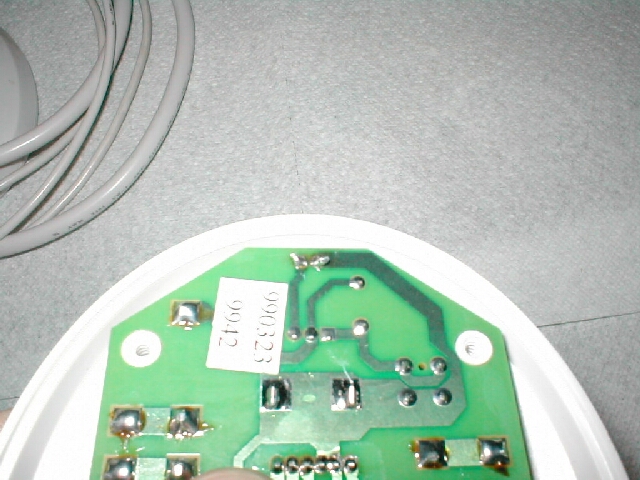
Here is the before shot of the LED that we are going to be changing, I know it looks yellow but I assure you that it is really green.There are 4 screws on the bottom of the speaker with the LED that you are going to need to removeRemove the 4 screws and take of the footplate, I have 1 more screw which is holding the PCB in place which I removed as well.Now that you have removed the screw that was holding the PCB on, you can now pull it out. Find where the LED is and how it is soldered onto it.


My LED was soldered into the PCB through 2 holes so I went ahead and de-soldered the 2 points on the back of the PCB, if you can’t de-solder you can cut the LED below the bulb and solder the new one onto the existing leads.
Take the new LED that you are going to install and insert it through the 2 holes. Bend the pins so that you have the LED bulb at the right height. (Depending on where it is going to need to be when you put everything back together.) Be sure that you have the LED in right; meaning the anode and cathode are on the same side the stock LED was.


Now you will need to re-solder the wires on the back of the PCB on the solder points where they were before, be sure that you do not have any solder bleed over onto the other point.
After you have the wires soldered into place go ahead and cut the excess off.


Go ahead and put the PCB back into place, and put all the wires where they go so that you can screw the footplate back on. Also Screw the screw back in that was holding the PCB in place if you have one.
Screw the footplate back into place and you should now have a finished product. Here is my speaker with the new red led.


Power it on up and enjoy your new LED whatever color you choose to use.

You are now one step closer to getting rid of those ugly stock speaker lights.